Working or studying from home without a dedicated room can make any apartment feel too small. Your desk may compete with the sofa for space, documents can become mixed with household items, and even after the workday ends, the office remains in plain sight.
The good news is that a functional home office does not require an empty bedroom. It can occupy one wall in the living room, part of the bedroom, a corner near the kitchen, or even the inside of a closet. What truly matters is choosing a location that works with your routine and creating clear boundaries between work and personal life.
With careful planning, you can build a comfortable, organized workstation that blends into your apartment without blocking walkways or making your entire home feel like an office.
Choose the Location Based on Your Routine
Before buying a desk, observe how your apartment functions throughout the day. The best location is not necessarily the empty corner. It is the area that provides the right conditions during your working hours.
Consider:
- Noise levels;
- Natural light;
- Access to electrical outlets;
- Wi-Fi signal strength;
- Household traffic;
- Ventilation and temperature;
- The background visible during video calls.
If you work early while someone else uses the living room, placing your desk there may create daily conflicts. If you attend frequent meetings, a corner of the bedroom may offer more privacy.
Spend some time in the location before committing to it. Make a video call, test the Wi-Fi, and observe how sunlight enters the area. A short trial can prevent you from creating a workspace that looks attractive but feels uncomfortable.
Use Areas That Are Usually Overlooked
Small apartments often contain underused spaces that can accommodate a compact workstation.
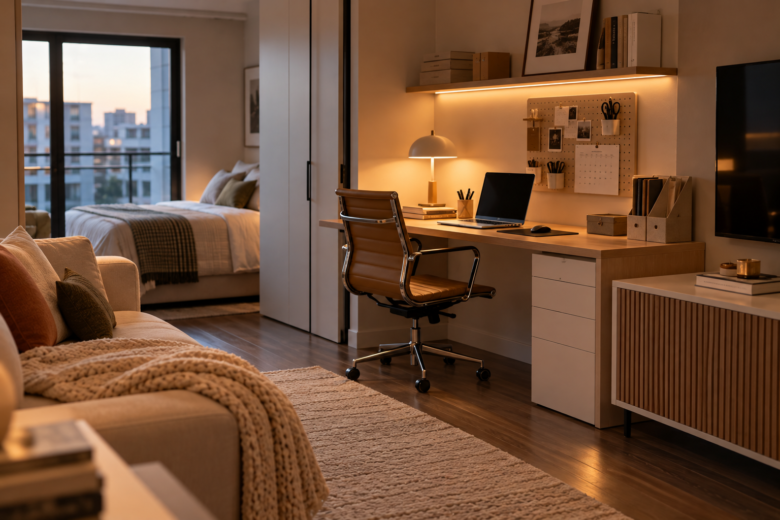
An empty living room wall may fit a narrow desk. A corner near a window could work with a corner-style desk, while the space behind a sofa may also be useful if it does not interfere with traffic flow.
Other possibilities include:
- A section of a hallway that is not a major walkway;
- A recessed area between two walls;
- The side of a wardrobe;
- An underused closet;
- A wide countertop;
- The area beneath a staircase, when available.
Avoid setting up the office in front of doors, closets, heating vents, or air-conditioning registers. The workstation should fit without forcing anyone to step around a chair, cables, or equipment.
Choose a Desk That Fits the Apartment
A larger desk does not automatically create a better workspace. In a small apartment, excessive width or depth can affect the entire room.
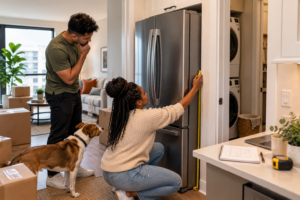
Before making a purchase, measure:
- The width of the wall;
- The available depth;
- The space required to pull out the chair;
- The distance from doors and other furniture;
- The height of windows, outlets, and baseboards.
A narrow desk may be enough if you mainly work from a laptop. A corner desk can make use of an awkward area, while a fold-down model allows you to reclaim the space after work.
Wall-mounted desks can also be practical, but renters should obtain permission before installing one. Always review the lease before drilling into walls.
Do Not Ignore Ergonomics
In a small home office, it can be tempting to use a dining chair or work from the sofa. That may be acceptable for a few minutes, but it can quickly become uncomfortable during a full workday.
Your chair should allow your feet to rest securely while keeping your knees in a comfortable position. The monitor should be close to eye level so that you do not spend hours looking downward.
If you use a laptop, consider adding a stand with a separate keyboard and mouse. A sturdy platform at the correct height can serve as a footrest, provided it does not slide.
The goal is not to create an expensive corporate office. It is to protect your body during the hours you spend working.
Organize Cables Before They Take Over
Visible cables can make a small workspace look even more cluttered. Wires crossing the floor can also create a tripping hazard.
Position the desk close to an outlet whenever possible so you do not need long extension cords. Use cable clips, removable covers, or a cord-management box to contain power strips and chargers.
Identify the cables you use regularly and remove anything unnecessary. Be careful not to overload outlets or extension cords, especially when connecting a computer, monitor, printer, and other equipment to the same source.
If a cable must cross the floor, cover and secure it properly instead of leaving it loose in a walkway.
Create Visual Boundaries Around the Workspace
When your office shares space with the living room or bedroom, defining the area can help your brain recognize when the workday begins and ends.
You can create separation with:
- A small area rug;
- A dedicated desk lamp;
- A subtle decorative color;
- An open shelving unit;
- A wall organizer;
- A folding room divider.
You do not need to build a wall. The purpose is to give the office its own identity without closing off the room or blocking natural light.
At the end of the day, put away the laptop, close your notebooks, and turn off the desk lamp. This simple routine can reduce the feeling that you are still at work while trying to relax.
Take Advantage of Vertical Storage
When floor space is limited, the walls become an important part of the organization system. Shelves, pegboards, and hanging organizers can keep supplies accessible without requiring a larger desk.
Store only frequently used items near your workstation. Older documents, backup equipment, and replacement supplies can remain in another closet.
Closed storage boxes help conceal visually distracting objects. A compact space feels calmer when papers, chargers, and small accessories are not constantly on display.
Renters should prioritize removable solutions and confirm that any installation complies with the lease.
Plan Comfortable Lighting
When possible, position your desk near a window, but avoid placing the screen directly in front of or behind it. Either position may create glare or make video calls difficult.
Natural light should ideally come from the side. Add an adjustable desk lamp, especially if you work at night.
Think about what appears behind you during virtual meetings as well. An organized wall usually works better than a busy walkway or a visible bed. If you do not have an ideal background, keep the area within the camera frame clean and free from personal information.
Step by Step: Build Your Home Office
1. Review Your Routine
Define your schedule, required equipment, and need for privacy.
2. Test Possible Locations
Check the noise, Wi-Fi, outlets, temperature, and lighting.
3. Measure the Entire Area
Account for the desk, the chair when pulled out, and nearby walkways.
4. Select the Essential Furniture
Prioritize a properly sized desk, supportive chair, and monitor or laptop stand.
5. Organize the Cables
Keep every connection secure and away from high-traffic areas.
6. Add Storage
Use drawers, boxes, or vertical organizers to prevent clutter.
7. Define the Workspace Visually
Use lighting, a rug, or simple décor to distinguish it from the rest of the room.
8. Test the Setup
Work there for several days and adjust anything that causes discomfort.
Your Office Should Fit Both Your Home and Your Life
An effective home office is not the one that occupies the most space. It is the one that supports your routine without interfering with the rest of your apartment. Every decision should help you work comfortably while allowing your home to remain a place where you can rest.
When the desk respects the room’s natural flow, supplies have designated storage, and work can be visually put away, even a small corner can have a clear purpose.
Your apartment may not provide a door to close at the end of the workday. With the right boundaries, however, you can create something just as valuable: a space that helps your mind enter work mode, and leave it behind when the day is over.